
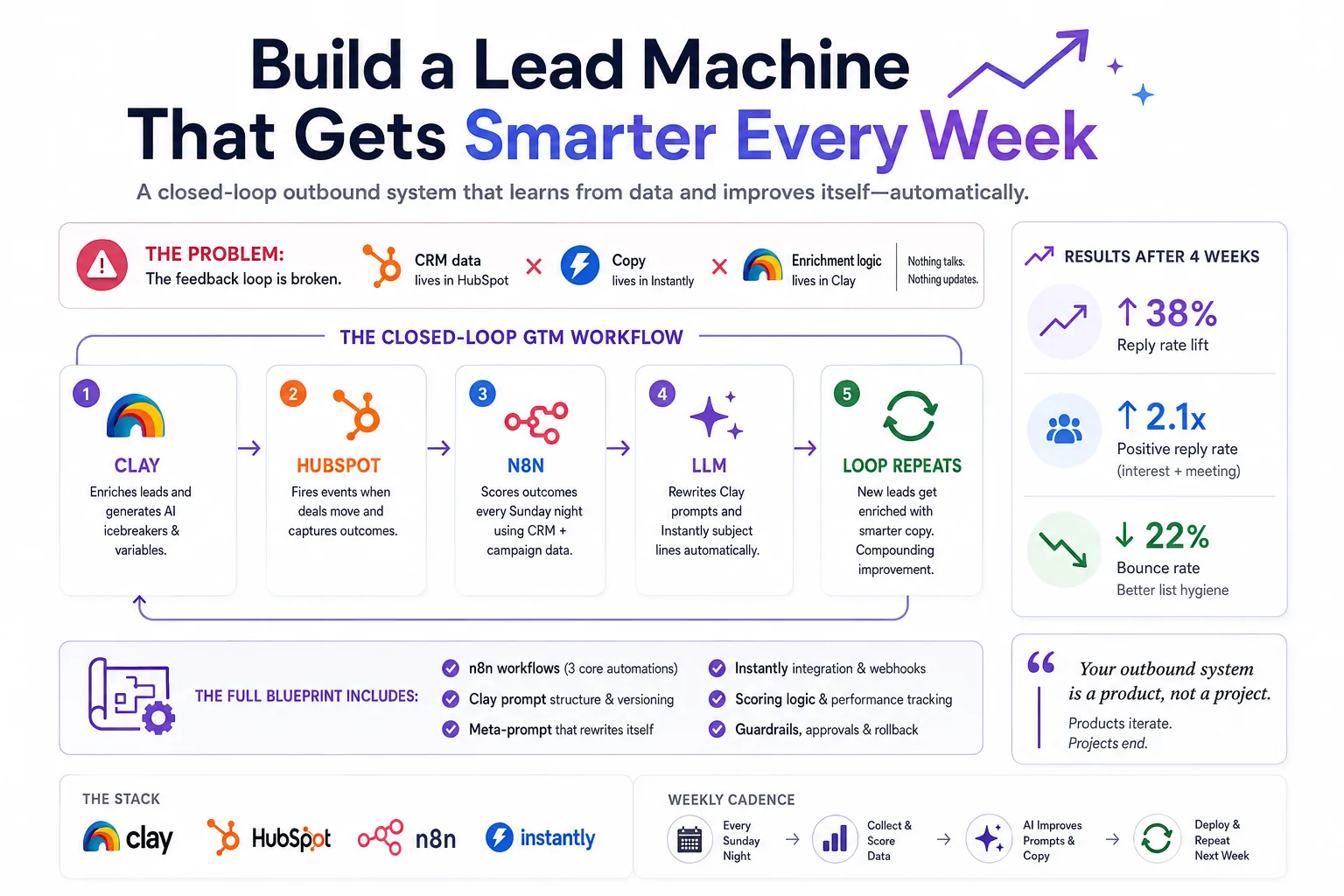
Most outbound stacks are set-and-forget. You spend three days building a sequence, it ships, open rates drop after week two, and nobody goes back in. The reason is simple: the feedback loop is broken. The data about what's working lives in HubSpot. The copy lives in Instantly. The enrichment logic lives in Clay. Nothing talks to anything else — and certainly nothing updates itself.
This article is a blueprint for closing that loop. We're building a system where n8n acts as the connective tissue, reading CRM outcomes weekly, scoring lead quality, evaluating email performance, and feeding that signal back into Clay's AI enrichment prompts and Instantly's sequence copy — automatically.
“Your outbound system is a product, not a project. Products have versioning, feedback loops, and iteration cycles. Projects end.”
Think in systems, not sequences
Think of this as a four-lane highway with a roundabout in the middle. Each tool has a lane. n8n is the roundabout — all traffic moves through it. The magic isn't any single integration; it's the closed feedback loop that makes the whole system compound over time.
Ground truth, not just a CRM
HubSpot is not just your CRM here — it's your ground truth signal layer. Every deal, every contact stage change, every call outcome needs to be structured as queryable data. That means being disciplined about custom properties before you build anything else.
Create these before wiring n8n: clay_enrichment_score, instantly_campaign_id, email_outcome (enum: replied / positive / meeting / no-response / bounced), icp_segment, and last_prompt_version. That last one is critical — it's how you A/B track which prompt generation produced this lead.
Set up a HubSpot workflow that fires a webhook to n8n whenever a deal moves to “Closed Won”, “Meeting Booked”, or a contact's email_outcome field updates. This is your real-time feedback pipe.
Weekly, n8n pulls a HubSpot report via API: all contacts created in the last 30 days, grouped by icp_segment and last_prompt_version, with their deal outcomes. That's your scoring matrix.
Use the CRM search endpoint: POST /crm/v3/objects/contacts/search with filters for createdate in last 30 days and hs_lead_status not empty. Group results client-side in n8n's Function node by icp_segment × last_prompt_version. Calculate conversion rate per bucket.
AI columns that actually compound
Clay is the engine room. Most teams use it for basic enrichment — pull email, company size, LinkedIn. That's leaving 80% of the value on the table. The real power is AI columns that generate personalized context using everything Clay can see.
Here's the icebreaker generation prompt at v1, before the loop has run:
The prospect is {{first_name}}, {{job_title}} at {{company_name}}.
Their company recently {{recent_news}}. They use {{tech_stack}}.
Write a specific, non-generic icebreaker that references something real about their business.
Max 20 words. No em dashes. No ‘I noticed’.
After two weeks of the self-improvement loop running with real CRM outcome data, that same prompt auto-updates to look like this:
The prospect is {{first_name}}, {{job_title}} at {{company_name}} ({{employee_count}} employees).
Performance data shows icebreakers that mention hiring signals or recent product launches convert 3.2x better in this ICP.
Their company recently {{recent_news}}. If that's a hiring signal or launch, lead with it.
Otherwise reference {{tech_stack}} competition.
Max 18 words. No em dashes. No ‘I noticed’. Use active voice.
The difference is context from outcomes. The AI now knows that hiring signals work better for this segment — because n8n told it, based on HubSpot data.
Clay exposes a PATCH /tables/{tableId}/columns/{columnId} endpoint. n8n calls this with the new prompt text after the improvement cycle runs. Version the prompts in a Google Sheet or Notion database so you can roll back. The column's aiConfig.prompt field is what gets updated — fetch the current column config first, merge in the new prompt text, then PATCH the full object back.
Three workflows, one intelligence layer
n8n is where the intelligence lives. You need three primary workflows. Build them in this order — resist the urge to wire the AI update logic until the data collection is solid.
Webhook node listens for Instantly reply events + HubSpot deal stage changes. On trigger: update contact's email_outcome in HubSpot. Log event to Postgres or Airtable with timestamp, campaign_id, prompt_version, ICP segment. This is your raw event log — never skip it.
Pull last 30 days of HubSpot contacts. Pull Instantly campaign stats. Join on campaign_id. Calculate: reply rate, positive reply rate, meeting booked rate — all segmented by prompt_version and icp_segment. Identify top and bottom performers. Build a structured JSON scoring report. Do not trigger prompt updates from this workflow directly.
Takes the scoring JSON as input. Sends to Claude with the meta-prompt below. Parses the AI's updated prompt text. PATCHes Clay column. Updates Instantly sequence subject line via API. Logs the new prompt version back to HubSpot custom property for attribution. Sends Slack approval request before applying.
Here's the meta-prompt that powers the self-improvement engine — the core intelligence of the entire system:
SYSTEM: You are a GTM AI optimizer. You receive weekly performance
data from a B2B cold email system and output improved prompts.

INPUT:
- scoring_report: {JSON with reply rates by prompt_version + segment}
- current_clay_prompt: {string}
- current_subject_formula: {string}
- top_converting_emails: [{subject, body, outcome}] (top 5)
- worst_performing_emails: [{subject, body, outcome}] (bottom 5)

TASK:
1. Identify 2-3 patterns in top converters vs. bottom performers
2. Rewrite the Clay icebreaker prompt to amplify winning patterns
3. Rewrite the Instantly subject line formula
4. Output ONLY valid JSON:

{
  "new_clay_prompt": "...",
  "new_subject_formula": "...",
  "reasoning": "..."
}
The reasoning field is not throwaway metadata. Store it. It becomes your audit trail for why the system made each change — critical when you're debugging a prompt version that tanked metrics.
Treat it as a variable-rich template engine
Instantly handles sequencing, deliverability, and sending. Your job is to treat it as a variable-rich template engine, not a static sequence tool. Every Clay enrichment field should flow in as a custom variable — that's what makes the self-improvement loop meaningful.
Real numbers after 4 weeks
After four weeks of running this loop on a mid-market SaaS ICP (250–2,000 employees, VP+ titles, US/Canada), here's what consistent iteration produced:
The system doesn't improve linearly. The biggest jump usually comes after week two, when there's enough outcome data for the scoring engine to make statistically significant observations. Before that, it's noise. Don't touch the prompts manually until week three — let the loop run cold for two full cycles first.
“The metric to watch obsessively is positive reply rate by prompt version, not overall reply rate. Unsubscribes inflate the numbers. Positive replies are the real signal.”
A self-modifying system needs constraints
A self-modifying system can drift badly without guardrails. Build these in from day one — they're not optional extra work, they're what makes the system trustworthy enough to actually run unsupervised.
End-to-end data flow
Here's the complete data flow — the entire system in one view. Every arrow is a real API call or webhook. Nothing here is hypothetical.
Build in this order
Don't wire the self-improvement logic first. Week 1: get Clay → HubSpot → Instantly working cleanly, with all custom properties in place. Week 2: build the n8n event logger and let outcome data accumulate. Week 3: run the scoring engine manually and read the output yourself. Only then automate the prompt updates.
Premature automation on noisy data makes things worse. The two-week cold-run period is not optional — it's when you learn to trust your own signal before handing it to a model.
On n8n hosting: self-hosted gives you more flexibility on webhook volume and custom nodes, but n8n Cloud works fine under roughly 10,000 webhook events per month. If you're doing serious volume, self-host on a $20/mo VPS from day one.
The system ships an improvement every Sunday night — automatically.
Start with the n8n scoring workflow before you touch any self-modification logic. Spend two weeks reading your own data. You'll discover patterns that will shape the entire improvement logic — and you'll trust the system far more when you've seen the signal yourself before letting the AI act on it.
Want this loop on your stack?
I help teams wire HubSpot, Clay, n8n, and outbound tools into systems that compound — not decay.

20+ years from SDR and AE to revenue ops and systems architecture. I ship automation that runs in production — CRM, enrichment, orchestration, and AI prompts included.