
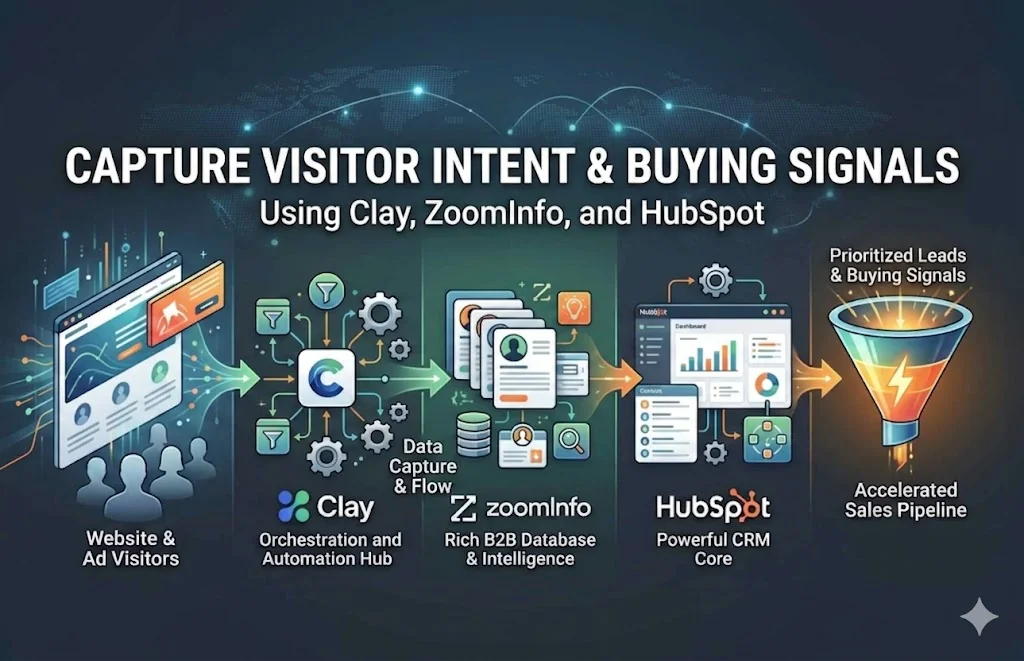
Understanding visitor intent is the difference between guessing and closing. Instead of treating every lead the same, modern GTM teams use data tools like Clay, ZoomInfo, and HubSpot to identify who is ready to buy, what they care about, and when to act.
This guide walks through how to combine these tools into a powerful intent-driven pipeline.
1. What Is Visitor Intent?
Visitor intent refers to signals that indicate a prospect’s likelihood to take action. These signals come from:
- Website behavior (pages visited, time spent)
- Ad engagement (clicks, conversions)
- Firmographic data (company size, industry)
- Buying signals (research activity, competitor comparisons)
The goal is to turn anonymous traffic into qualified, prioritized leads.
2. Core Stack Overview
HubSpot (Foundation)
- CRM + Marketing Automation
- Tracks website activity and conversions
- Stores contacts and lifecycle stages
ZoomInfo (Data + Intent Signals)
- B2B contact and company database
- Intent data (topics companies are researching)
- Enrichment for leads
Clay (Automation + Enrichment Layer)
- Connects APIs and data sources
- Automates enrichment workflows
- Builds custom scoring and signal pipelines
3. Step-by-Step: Capturing Intent Signals
Step 1: Track Website Behavior in HubSpot
Start by enabling:
- HubSpot tracking pixel
- Form submissions
- Event tracking (button clicks, pricing page visits)
Key signals to track:
- Pricing page visits
- Demo page visits
- Multiple sessions in short time
- Returning visitors
Example: If someone visits your pricing page three times in two days, that is high intent.
Step 2: Identify Anonymous Visitors
Most traffic is anonymous. To uncover them, use:
- HubSpot’s IP tracking
- Reverse IP tools (Clearbit, RB2B, and similar)
You’ll get:
- Company name
- Industry
- Location
This gives you account-level intent, even without a form fill.
Step 3: Enrich with ZoomInfo
Push identified companies into ZoomInfo to:
- Find decision-makers (VP, Director, and similar)
- Add verified emails and phone numbers
- Pull intent topics (for example, “AI automation”, “CRM tools”)
Now you know who is visiting and what they’re researching.
Step 4: Build Signal Pipelines in Clay
Clay acts as your orchestration layer.
Example workflow
Input: Website visitors (from HubSpot or your IP tool)
Enrichment: Pull company and contacts from ZoomInfo; add LinkedIn profiles; add firmographics (revenue, size).
Intent scoring:
- +10 points → Pricing page visit
- +15 points → Demo page visit
- +20 points → ZoomInfo intent match
- +5 points → Ad click
Output: Send high-score leads back to HubSpot; trigger outreach.
Step 5: Capture Ad Intent Signals
From platforms like Google Ads and LinkedIn Ads, track:
- Click-throughs
- Form fills
- Retargeting engagement
Push this data into Clay or HubSpot and combine it with website visits and CRM activity.
Example: Someone clicks an ad, visits your site, then returns later organically—a strong buying signal.
Step 6: Sync Everything Back to HubSpot
HubSpot becomes your single source of truth. Create:
- Custom properties (Intent Score, Last Activity, Topics)
- Smart lists (High Intent Leads)
- Workflows (automated actions)
4. Automating Outreach Based on Intent
Once signals are captured, automate actions:
High Intent (Hot Leads)
- Trigger immediate sales outreach
- Assign to SDR
- Personalized email referencing activity
Medium Intent
- Add to nurture sequence
- Send relevant content
Low Intent
- Retarget with ads
- Track for future activity
5. Example End-to-End Flow
- Visitor lands on your site from a LinkedIn ad
- Visits pricing page twice
- HubSpot tracks activity
- Clay enriches visitor using ZoomInfo
- Intent score crosses threshold
- Lead pushed to HubSpot
- SDR gets alert and automated email is sent
Result: Faster response and a higher conversion rate.
6. Best Practices
- Focus on signals, not just leads. Behavior matters more than form fills.
- Combine multiple data sources. Website + ads + third-party intent gives you the full picture.
- Keep scoring simple at first. Don’t overcomplicate early models.
- Act fast. Intent decays quickly—timing is critical.
7. Common Mistakes to Avoid
- Relying only on form submissions
- Ignoring anonymous traffic
- Not syncing tools properly
- Overloading sales with unqualified leads
- No clear scoring model
8. Final Thoughts
The real advantage isn’t just having tools like Clay, ZoomInfo, or HubSpot—it’s how you connect them into a signal-driven system.
When done right, you move from:
- Cold outreach → Warm, intent-driven conversations
- Guessing → Data-backed prioritization
- Slow response → Real-time engagement
Have an idea?
Let's build it.
Whether you're starting from scratch or need help scaling, I'm here to turn your vision into reality.

18+ years building MVPs and solving hard tech problems for startups. I help founders move fast and ship products that matter.