Every sales call is a data event. A 45-minute discovery call contains deal stage signals, buying committee mentions, competitor references, action items, sentiment shifts, and objection patterns — all of which should immediately update your CRM, trigger next-step sequences, and inform your pipeline forecast.
Instead, most SDRs spend 15–20 minutes after every call manually logging notes, creating tasks, updating opportunity stages, and kicking off follow-up sequences. At five calls a day, that's over 1.5 hours of administrative overhead — on a good day.
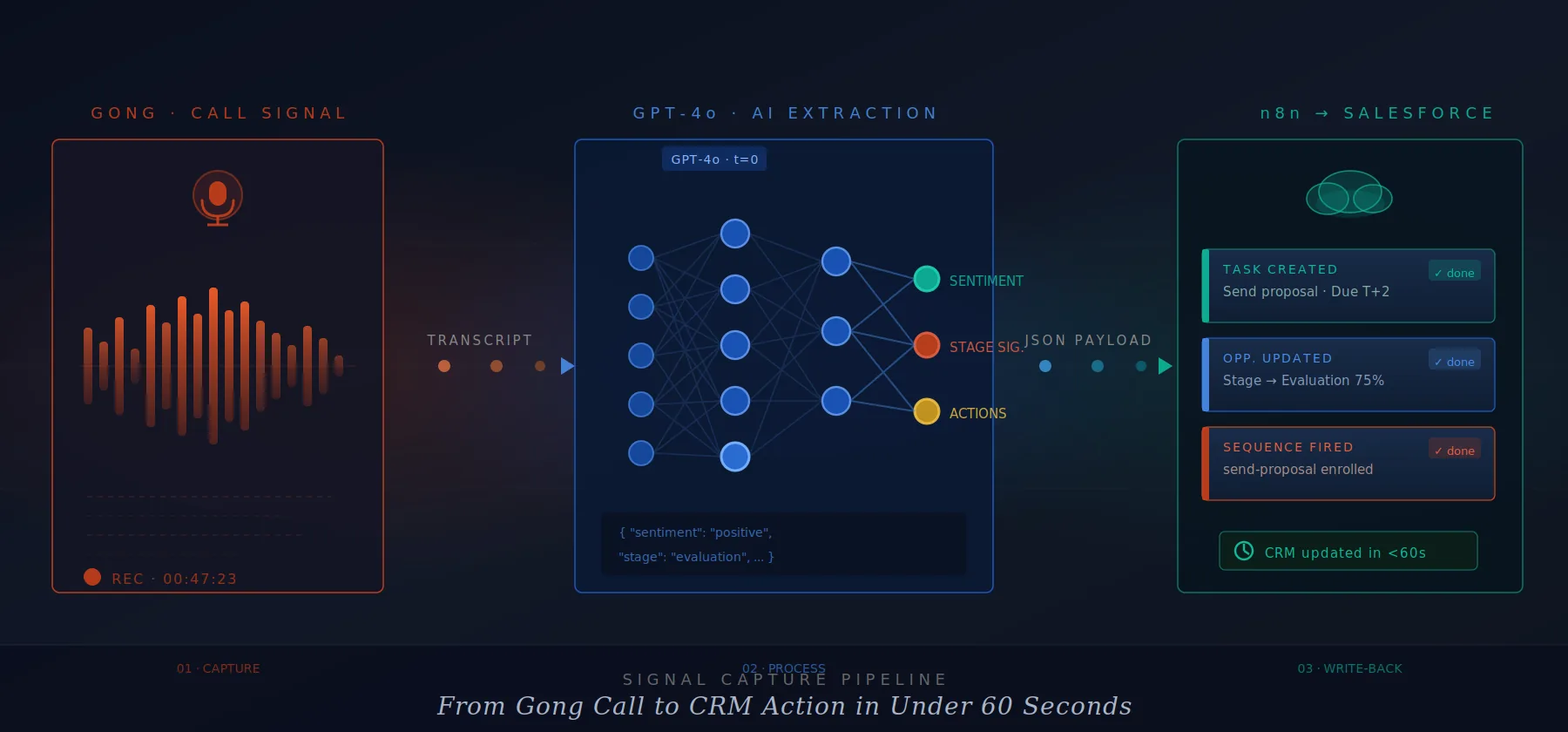
This playbook wires three tools into a single automated pipeline that eliminates that overhead entirely: Gong for call recording and transcript delivery, GPT-4o for intelligent signal extraction, and n8n for Salesforce write-back and sequence triggering.
The Pipeline at a Glance
The architecture follows a simple three-stage signal capture loop triggered automatically the moment a Gong call ends:
Total elapsed time from call end to fully updated CRM: under three minutes. What previously took an SDR 15–20 minutes of manual work happens invisibly, with higher consistency and zero omissions.
Step 1 — Signal Capture via Gong
Configure the Gong Webhook
Navigate to Gong's integration settings and register an n8n webhook URL as the call-completed event receiver. Gong fires this webhook within 90–120 seconds of a call ending, once transcription is complete.
The payload Gong sends includes the call ID, duration, participants, CRM association (opportunity or contact ID), and the full transcript body. Configure the webhook to fire on call.completed events only — you don't need recording-started or in-progress events for this pipeline.
{
  "eventType": "call.completed",
  "callId": "8571920384",
  "duration": 2847,
  "parties": [
    { "name": "Alex Rivera", "role": "rep" },
    { "name": "Jamie Chen", "role": "prospect" }
  ],
  "crmAssociation": {
    "opportunityId": "0065g00001QXa9BAAT",
    "contactId": "0035g00001HYnM2AAL"
  },
  "transcript": "[full transcript text...]"
}
If your Salesforce opportunity IDs are already embedded in Gong's CRM sync, they arrive in this payload automatically. If not, use the Gong REST API's /v2/calls/{callId}/transcript endpoint to fetch the full structured transcript after the webhook fires.
What signals to look for
Before building the AI extraction layer, define what constitutes a signal worth capturing. For SDR-to-AE pipeline work, the high-value signal categories are:
- → Budget confirmed / denied
- → Timeline mentioned ("Q3 deadline")
- → Decision-maker identified
- → Competitor mentioned
- → Technical evaluation requested
- → Champion language ("I'll push for this")
- → Send pricing / proposal
- → Schedule next meeting
- → Introduce technical contact
- → Share case study / reference
- → Follow-up date committed
- → Internal stakeholder loop-in
Step 2 — AI Processing with GPT-4o
The Extraction Prompt
Inside your n8n workflow, add an HTTP Request node pointed at the OpenAI Chat Completions API. The model receives the raw transcript and a structured extraction prompt. The key design principle: always return valid JSON with a fixed schema. This makes downstream Salesforce mapping deterministic.
You are a sales intelligence assistant. Extract structured signals from the following B2B sales call transcript. Return ONLY valid JSON matching the schema below. Do not include any explanation or markdown.

Schema:
{
  "summary": string (2-3 sentences, factual),
  "sentiment": "positive" | "neutral" | "negative",
  "sentiment_reasoning": string (one sentence),
  "deal_stage_signal": "discovery" | "evaluation" | "negotiation" | "closed_won_signals" | "closed_lost_signals" | "no_signal",
  "stage_confidence": number (0.0–1.0),
  "budget_mentioned": boolean,
  "timeline_mentioned": boolean,
  "timeline_detail": string | null,
  "competitors_mentioned": string[],
  "decision_makers_identified": string[],
  "action_items": [{ "owner": "rep"|"prospect", "action": string, "due": string|null }],
  "next_step_agreed": boolean,
  "next_step_detail": string | null,
  "risk_flags": string[],
  "recommended_sequence": "follow_up_1" | "send_proposal" | "technical_eval" | "ghosted_recovery" | "none"
}
{
  "method": "POST",
  "url": "https://api.openai.com/v1/chat/completions",
  "authentication": "Bearer {{$env.OPENAI_API_KEY}}",
  "body": {
    "model": "gpt-4o",
    "temperature": 0,
    "response_format": { "type": "json_object" },
    "messages": [
      {
        "role": "system",
        "content": "[system prompt above]"
      },
      {
        "role": "user",
        "content": "Transcript:\n\n{{$node.Gong.json.transcript}}"
      }
    ]
  }
}
For extraction tasks where you need consistency and determinism — not creativity — always set temperature to 0. This ensures the same transcript produces the same structured output every time, which is critical for reliable CRM write-back and auditability.
A 45-minute call transcript averages 6,000–8,000 tokens. At GPT-4o pricing (~$2.50/1M input tokens), that's roughly $0.015–$0.02 per call. For a team running 100 calls/week, this pipeline costs under $10/week in LLM compute.
"The signal is already in the call. The only question is whether your system captures it in real time or lets it decay in someone's memory."
— GTM Engineering Principle
Step 3 — CRM Write-Back via n8n
n8n Workflow — Salesforce Write-Back
After GPT returns the parsed JSON, n8n fans out into three parallel branches based on what was extracted. Each branch handles a distinct Salesforce operation. Use a Switch node to route based on extracted signals before the parallel branches execute.
Branch A — Task Creation
For every action item where owner === "rep", create a Salesforce Task linked to the opportunity. Map the extracted action description to the Task Subject, set due date from the due field if present, and default to T+2 business days if null.
// For each action_item where owner === "rep"
{
  "WhatId": "{{$node.Gong.json.crmAssociation.opportunityId}}",
  "WhoId":  "{{$node.Gong.json.crmAssociation.contactId}}",
  "Subject": "{{item.action}}",
  "ActivityDate": "{{item.due ?? addBusinessDays(today, 2)}}",
  "Description": "Auto-created from Gong call {{$node.Gong.json.callId}}. Summary: {{$node.GPT.json.summary}}",
  "Status": "Not Started",
  "OwnerId": "{{$node.Gong.json.repSalesforceId}}"
}
Branch B — Opportunity Stage Update
Map the extracted deal_stage_signal to your Salesforce opportunity stage values. Only update the stage if stage_confidence exceeds 0.75 — this prevents low-confidence extractions from corrupting your pipeline data. Always append the AI summary to the opportunity description rather than overwriting it.
const stageMap = {
  "discovery":           "Discovery / Qualifying",
  "evaluation":          "Solution Evaluation",
  "negotiation":         "Negotiation / Review",
  "closed_won_signals":  "Commit",
  "closed_lost_signals": "At Risk — Review"
};

// Only write if confidence threshold met
if (gpt.stage_confidence >= 0.75 && gpt.deal_stage_signal !== "no_signal") {
  salesforce.update("Opportunity", {
    Id: opportunityId,
    StageName: stageMap[gpt.deal_stage_signal],
    AI_Call_Summary__c: gpt.summary,
    AI_Sentiment__c: gpt.sentiment,
    Competitors_Mentioned__c: gpt.competitors_mentioned.join(";"),
    Next_Step__c: gpt.next_step_detail,
    Last_AI_Analysis_Date__c: new Date().toISOString()
  });
}
Branch C — Sequence Trigger
Based on the recommended_sequence field GPT returns, fire the appropriate Salesforce Engage or Outreach sequence via webhook. Use a Switch node in n8n to route to the correct sequence endpoint. This is where the pipeline creates the most immediate rep value — the follow-up email goes out within minutes of the call ending, while the conversation is still fresh for the prospect.
// Switch on gpt.recommended_sequence value
"follow_up_1"       → POST /sequences/std-follow-up/enroll
"send_proposal"     → POST /sequences/proposal-sent/enroll
"technical_eval"    → POST /sequences/tech-eval-intro/enroll
"ghosted_recovery"  → POST /sequences/re-engagement-30d/enroll
"none"              → // No sequence — log only
Add the Gong call ID and sentiment to each sequence enrollment payload so your sales engagement platform can reference the call context in personalized email copy.
The Hours-Reclaimed Report
This is the section your VP of Sales actually cares about. Build a weekly report that translates pipeline automation into concrete time savings at the rep level. Here's the full measurement framework.
Baseline: What manual post-call work actually costs
| Manual task (post-call) | Avg time / call | Calls / week / rep | Hours / week / rep |
|---|---|---|---|
|
Write call notes in CRM
Summary, key quotes, objections
|
7 min | 5 | 0.58 hr |
|
Create follow-up tasks
One task per action item committed
|
4 min | 5 | 0.33 hr |
|
Update opportunity stage + fields
Stage, close date, next step, competitors
|
5 min | 5 | 0.42 hr |
|
Trigger follow-up sequence manually
Navigate to engagement platform, enroll, customize
|
6 min | 5 | 0.50 hr |
| Total manual post-call admin | 22 min | 5 | 1.83 hrs / rep / week |
For a team of 10 SDRs, that's 18.3 hours per week — the equivalent of half an FTE — spent on data entry instead of selling. Annualized: over 950 hours of potential selling time lost to CRM administration.
Report metrics — what to put on the dashboard
Structure the weekly report into four categories. Each metric should be pull-able from your Salesforce + n8n logs without additional tooling.
The executive-ready summary stat
For leadership, reduce this to one number per week:
Track this weekly. Any week below 90% signals a pipeline health issue — likely a Gong webhook failure, an OpenAI API timeout, or a Salesforce field mapping error. Set an n8n error alert to fire on Slack immediately when processing failures exceed 5% of calls.
Rollout Sequence
Don't try to automate everything in week one. This sequence works:
- Week 1–2: Gong webhook + GPT extraction only. Write extracted JSON to a Google Sheet or Notion database. No Salesforce writes yet. Run for 50 calls and manually validate AI accuracy against what reps would have written.
- Week 3–4: Add Salesforce task creation. Low risk — tasks are additive. Have reps review auto-created tasks for one week and give thumbs up/down feedback to calibrate the action item extraction prompt.
- Week 5–6: Add opportunity stage updates with the 0.75 confidence threshold guard. Monitor for false positives. Add the AI summary and sentiment to custom Salesforce fields.
- Week 7+: Enable sequence auto-enrollment. Start with low-risk sequences (standard follow-up, send proposal). Keep ghosted recovery as human-triggered until you've validated the AI on edge cases.
The Real ROI Argument
The time reclaimed argument is compelling, but the deeper value is signal consistency. A manual logging process captures roughly 60% of calls — reps skip logging after back-to-back meetings, end-of-day fatigue, or when a call feels unproductive. This pipeline captures 100% of calls, automatically, with standardized fields that make pipeline forecasting actually reliable.
When your VP of Sales can look at AI_Sentiment__c across the entire pipeline and see which deals have consistently negative sentiment over three consecutive calls, that's a qualitative insight that was previously invisible — buried in call recordings that nobody had time to review.
That's the real unlock: not just time saved, but signal that was never captured at all now flowing into every forecast, every deal review, every rep coaching session.
Ready to go from Gong call
to CRM action in under a minute?
If you want to wire Gong, LLMs, and orchestration into a pipeline that updates Salesforce in seconds—not spreadsheets—I help revenue teams design and ship that automation.

18+ years building MVPs and solving hard tech problems for startups. I help founders move fast and ship products that matter.